Bring LINE, website and front-desk bookings into one schedule. Give your team a shared view of availability and make it easier for customers to choose a time.
The problem is not having no system. It is having three.
Salons that double-book several times a month usually have all the tools already: a calendar, a staff LINE group, a diary at the counter. The trouble is that none of the three knows about the others. A stylist writes a walk-in into the diary, an admin takes a booking in chat, and it can be half a day before anyone copies either into the calendar.
That half-day gap is where double bookings happen, and it does not only affect disorganised salons. The busier you are, the more dangerous the gap gets, because every minute of it someone is genuinely trying to book.
Signs it is time to change
You answer customers with “let me check the schedule” and come back to them later
You have had to phone someone to move an appointment you took twice
Each stylist keeps their own schedule in their head and nobody can cover for them
A customer asks about Saturday at 9pm and hears back the next morning
How it works
How booking works in Zentr
The schedule is the salon's single source of truth. Whether a booking arrives through chat, through your website, or is keyed in at the counter, all of them write to the same schedule and show up immediately.
Slot locking
Locked in real time. Double booking is not possible.
The instant a customer picks a time, that slot is locked. Anyone else mid-conversation stops seeing it altogether. It is not a re-check at the confirm step.
Result
No appointments you have to phone up and move
Schedules
Per stylist, per branch, per service type
Every stylist has their own schedule, different services take different amounts of time, and the system counts turnaround time between appointments. So it only offers slots that are genuinely workable, not ones that merely look free on paper.
Slips arrive in the conversation, attached to the booking
Customers attach the transfer slip in chat and the system keeps it with that booking, so nobody is scrolling back through a thread when the customer arrives.
Best for
High-value services and first-time customers
Reminders
Confirmed at booking, reminded before the day
The confirmation goes out as soon as the booking is made, with the location and a reschedule button, then a reminder before the appointment itself. Fewer forgotten appointments and fewer silent no-shows.
Reschedule button
Customers move it themselves; the old slot goes back on sale
Booking example
From checking availability to a confirmed booking
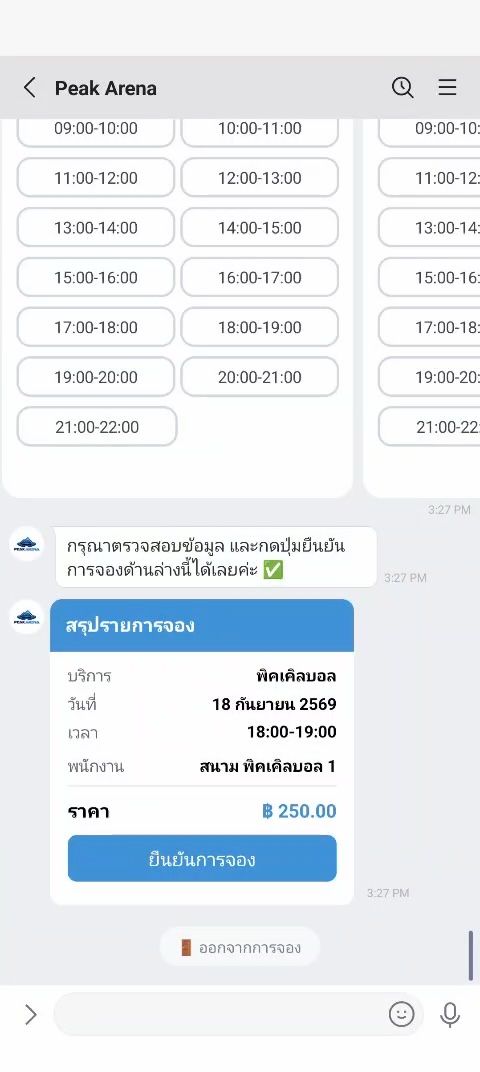
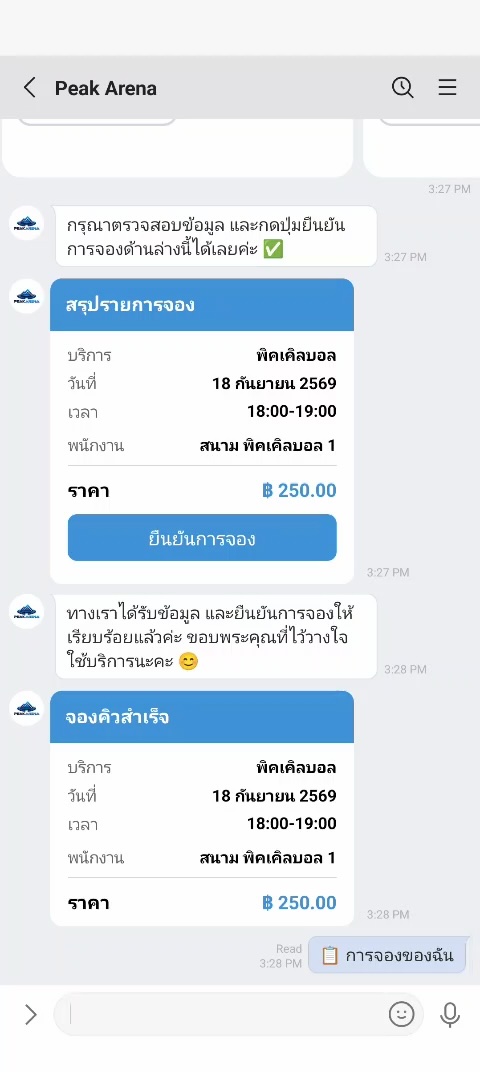
These Thai-language Zentr Sport examples show a court booking in chat, from choosing an open slot to receiving confirmation.
Step 1 · Choose a time
See available slots before booking
Customers review open court times and choose the slot they want directly in the conversation.
Step 2 · Confirm the booking
Review the details and receive confirmation
After confirmation, the customer has the service, date, time and price saved in the chat.
How to pick a booking system you will not replace in six months
Nearly every booking system demos well, because demos run on an empty schedule. What makes salons switch again is the stuff that never comes up in a demo. Ask whoever you are talking to these questions.
If two customers pick the same slot at the same moment, what stops the clash — a lock at selection, or a check at confirmation?
Is turnaround time between appointments counted automatically, or do you have to pad it yourself every time?
Do bookings keyed in at the counter appear to online channels straight away?
Does customer history belong to the salon or to the stylist? If a stylist leaves, does the history leave too?
If you stop using it, in what form do you get your data out?
That last one matters more than it sounds. A system you cannot get data out of is a system you cannot leave. With Zentr, if you finish the trial and decide against it, everything is exported to a file for you.
Migration
Moving off your current system without pausing bookings
Salons switching mid-season all worry about the same thing: losing bookings during the move. So we import your appointments and customer list from Excel, Google Calendar or your existing booking system — and during the trial our team does the first migration for you at no cost.
Prepare your services, prices, opening hours and staff schedules before setup. The time needed depends on your channels and existing data; our team can help plan the steps for your business.
Questions
Questions people ask about this
How is this different from just using Google Calendar?
A calendar stores appointments, but it does not know which stylist can perform which service, it does not count turnaround time between appointments, and it does nothing to stop two people booking the same slot at once. A calendar records the outcome; a booking system decides what is bookable.
Do customers have to install an app?
No. They book through the LINE account they already use, or through your website. There is no sign-up step before booking.
We have several branches. Can they share one schedule?
Yes. Schedules are split by branch and by the stylists in that branch. Customers choose a branch first and then only see slots that branch can genuinely take.
Can admins still edit a booking the AI made?
Always. Every booking appears on the admin screen alongside the conversation it came from, and can be edited or cancelled. You can also set rules requiring human confirmation for certain work — high-value services or first-time customers, for instance.
Does this work for sports venues and badminton courts?
Venues sell time by the hour too, but they sell space rather than a particular person's day, they have regular groups booked for a whole term, and they usually run a pro shop and a cafe on the same premises. That is a different enough shape that it has its own edition: Zentr Sport, built for badminton, tennis and pickleball venues. It is currently Thai-only.
See how many bookings your first night was losing
Connect LINE OA and you can be taking real bookings the same day. Our team handles the first migration of your appointments and customer list.